altcha
The altcha middleware provides self-hosted, proof-of-work captchas in the ALTCHA v3 format for Flame instances. The browser spends a moment searching for a number, and the server checks the answer with two HMACs. There is no third-party service, no cookie, and no tracking.
You can read source code of this middleware on GitHub and API documentation on pkg.go.dev.
Installation
go get github.com/flamego/altchaUsage examples
The altcha.Challenger is used in combination with altcha.Options. The altcha.Challenge.HTML renders the widget, and the altcha.Challenge.Verify should be used to verify the solution the widget writes to the form field named altcha:
package main

import (
	"net/http"
	"os"

	"github.com/flamego/altcha"
	"github.com/flamego/flamego"
	"github.com/flamego/template"
)

func main() {
	f := flamego.Classic()
	f.Use(template.Templater())
	f.Use(altcha.Challenger(
		altcha.Options{
			Secret: []byte(os.Getenv("ALTCHA_SECRET")),
		},
	))
	f.Get("/", func(t template.Template, data template.Data, c altcha.Challenge) {
		data["AltchaHTML"] = c.HTML()
		t.HTML(http.StatusOK, "home")
	})
	f.Post("/", func(w http.ResponseWriter, r *http.Request, c altcha.Challenge) {
		if err := c.Verify(r.PostFormValue(altcha.FieldName)); err != nil {
			w.WriteHeader(http.StatusBadRequest)
			_, _ = w.Write([]byte(err.Error()))
			return
		}
		w.WriteHeader(http.StatusOK)
		_, _ = w.Write([]byte("Verified!"))
	})

	f.Run()
}Below is how it would look like in your browser for the above example:
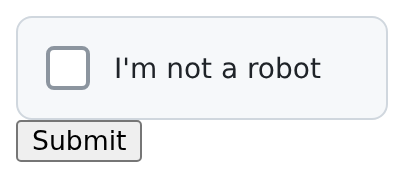
The Secret must be at least 16 bytes of random data, such as from openssl rand -hex 32, and the same on every server that verifies solutions.
The middleware serves challenge.json, widget.js and worker.js under the URLPrefix, which is /.altcha/ by default. When the user clicks the checkbox, or submits the form before doing so, the widget fetches a challenge, solves it in Web Workers, and writes the solution to the form. A solution works only once, so the widget solves a new challenge for the next submit.
The altcha.Challenge.Verify returns nil for a good solution, or one of these errors:
altcha.ErrInvalidwhen the payload is malformed, was not signed by this server, or does not solve its challenge.altcha.ErrExpiredwhen the challenge is older thanExpiry(5 minutes by default).altcha.ErrReplayedwhen the solution was already accepted once.
Difficulty
The browser tries MaxCounter / 2 counters on average (default 500), and each try runs Cost PBKDF2 iterations (default 5000). Raising either one makes every solution cost more, for people and bots alike, so measure on the devices your visitors use before raising them:
altcha.Options{
	Secret:     secret,
	Cost:       5000,
	MaxCounter: 200, // Lower for an easier check, higher for a harder one.
}
Verifying costs the server the same small amount whatever the difficulty, but issuing a challenge runs PBKDF2 once at Cost iterations. Anyone can request challenge.json without solving anything, so rate-limit that path per client.
altcha.Challenger with f.Use. A challenge only verifies with the Cost and URLPrefix that issued it.Running more than one server
The default store keeps accepted solutions in memory, so a solution accepted by one process could be accepted again by another. When several processes verify solutions, give them the same Secret and a shared altcha.ReplayStore as the Store. Its Use method must check and mark the key in one atomic step, for example with Redis SET key 1 NX EXAT expiresAt.
Translating the widget
The widget shows one short text in each state, in English by default. Pass altcha.Messages to altcha.Challenge.HTML to replace them, for example with translations from the i18n middleware. An empty field keeps the English default:
f.Get("/", func(t template.Template, data template.Data, c altcha.Challenge, l i18n.Locale) {
	data["AltchaHTML"] = c.HTML(altcha.Messages{
		Idle:      l.Translate("altcha.idle"),
		Verifying: l.Translate("altcha.verifying"),
		Verified:  l.Translate("altcha.verified"),
		Error:     l.Translate("altcha.error"),
		Retry:     l.Translate("altcha.retry"),
	})
	t.HTML(http.StatusOK, "home")
})
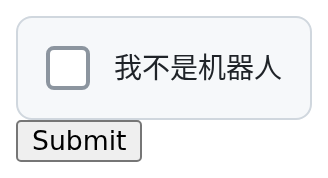
With the five altcha.* keys translated in the “zh-CN” locale file, the widget looks like this:
Styling the widget
There are three ways to change how the widget looks:
- Override the built-in rules. They are all wrapped in
:where(), so any rule of yours wins without!important. - Theme it with CSS custom properties on
.flamego-altcha, such as--altcha-color,--altcha-background,--altcha-border,--altcha-radius,--altcha-accent,--altcha-success,--altcha-mutedand--altcha-error. - Write your own markup. Add
data-unstyledto turn the built-in rules off, and put any element with classaltcha-checkinside the container; it becomes the control. The container’sdata-stateisidle,verifying,verifiedorerror:
<div class="flamego-altcha" data-unstyled data-challenge-url="/.altcha/challenge.json">
  <button type="button" class="altcha-check"><span class="altcha-label">Prove you're human</span></button>
</div>
<script src="/.altcha/widget.js" defer></script>
Using the official ALTCHA widget
The official widget (altcha 3.x on npm) works with this middleware without changes. Point it at the challenge URL instead of rendering altcha.Challenge.HTML; it writes its solution to the same altcha field:
<script type="module" src="https://cdn.jsdelivr.net/npm/altcha@3/dist/main/altcha.min.js"></script>
<form method="POST">
  <altcha-widget challenge="/.altcha/challenge.json"></altcha-widget>
  <button>Submit</button>
</form>