Core services
To get you off the ground, Flamego provides some core services that are essential to almost all web applications. However, you are not required to use all of them. The design principle of Flamego is always building the minimal core and pluggable addons at your own choice.
Context
Every handler invocation comes with its own request context, which is represented as the type flamego.Context. Data and state are not shared among these request contexts, which makes handler invocations independent from each other unless your web application has defined some other shared resources (e.g. database connections, cache).
Thereforce, flamego.Context is available to use out-of-the-box by your handlers:
func main() {
	f := flamego.New()
	f.Get("/", func(c flamego.Context) string {
        ...
	})
	f.Run()
}
Next
When a route is matched by a request, the Flame instance queues a chain of handlers (including middleware) to be invoked in the same order as they are registered.
By default, the next handler will only be invoked after the previous one in the chain has finished. You may change this behvaior using the Next method, which allows you to pause the execution of the current handler and resume after the rest of the chain finished.
package main

import (
	"fmt"

	"github.com/flamego/flamego"
)

func main() {
	f := flamego.New()
	f.Get("/",
		func(c flamego.Context) {
			fmt.Println("starting the first handler")
			c.Next()
			fmt.Println("exiting the first handler")
		},
		func() {
			fmt.Println("executing the second handler")
		},
	)
	f.Run()
}
When you run the above program and do curl http://localhost:2830/, the following logs are printed to your terminal:
[Flamego] Listening on 0.0.0.0:2830 (development)
starting the first handler
executing the second handler
exiting the first handler
The routing logger is taking advantage of this feature to collect the duration and status code of requests.
Remote address
Web applications often want to know where clients are coming from, then the RemoteAddr() method is the convenient helper made for you:
func main() {
	f := flamego.New()
	f.Get("/", func(c flamego.Context) string {
		return "The remote address is " + c.RemoteAddr()
	})
	f.Run()
}
The RemoteAddr() method is smarter than the standard library that only looks at the http.Request.RemoteAddr field (which stops working if your web application is behind a reverse proxy), it also takes into consideration of some well-known headers.
This method looks at following things in the order to determine which one is more likely to contain the real client address:
- The
X-Real-IPrequest header - The
X-Forwarded-Forrequest header - The
http.Request.RemoteAddrfield
This way, you can configure your reverse proxy to pass on one of these headers.
X-Real-IP and X-Forwarded-For headers can be forged directly by clients. Only trust the address returned by RemoteAddr() when your application is behind a trusted reverse proxy that removes incoming forwarding headers and sets them itself. If your application is exposed directly to the internet, use http.Request.RemoteAddr to identify the network peer. Do not use an untrusted address for security-sensitive decisions such as access control.Redirect
The Redirect method is a shorthand for the http.Redirect given the fact that the request context knows what the http.ResponseWriter and *http.Request are for the current request, and uses the http.StatusFound as the default status code for the redirection:
package main

import (
	"net/http"

	"github.com/flamego/flamego"
)

func main() {
	f := flamego.New()
	f.Get("/", func(c flamego.Context) {
		c.Redirect("/signup")
	})
	f.Get("/login", func(c flamego.Context) {
		c.Redirect("/signin", http.StatusMovedPermanently)
	})
	f.Run()
}Be aware that the Redirect method does a naive redirection and is vulnerable to the open redirect vulnerability.
For example, the following also works as a valid redirection:
c.Redirect("https://www.google.com")Please make sure to always first validating the user input!
URL parameters
URL parameters, also known as “URL query parameters”, or “URL query strings”, are commonly used to pass arguments to the backend for all HTTP methods (POST forms have to be sent with POST method, as the counterpart).
The Query method is built as a helper for accessing the URL parameters, and return an empty string if no such parameter found with the given key:
package main

import (
	"github.com/flamego/flamego"
)

func main() {
	f := flamego.New()
	f.Get("/", func(c flamego.Context) string {
		return "The name is " + c.Query("name")
	})
	f.Run()
}There is a family of Query methods available at your fingertips, including:
QueryTrimtrims spaces and returns value.QueryStringsreturns a list of strings.QueryUnescapereturns unescaped query result.QueryBoolreturns value parsed as bool.QueryIntreturns value parsed as int.QueryInt64returns value parsed as int64.QueryFloat64returns value parsed as float64.
All of these methods accept an optional second argument as the default value when the parameter is absent.
If you are not happy with the functionality that is provided by the family of Query methods, it is always possible to build your own helpers (or middlware) for the URL parameters by accessing the underlying url.Values directly:
vals := c.Request().URL.Query()Is flamego.Context a replacement to context.Context?
No.
The flamego.Context is a representation of the request context and should live within the routing layer, where the context.Context is a general purpose context and can be propogated to almost anywhere (e.g. database layer).
You can retrieve the context.Context of a request using the following methods:
f.Get(..., func(c flamego.Context) {
    ctx := c.Request().Context()
    ...
})

// or

f.Get(..., func(r *http.Request) {
    ctx := r.Context()
    ...
})
Default logger
The Charm’s *log.Logger is available to all handers for general-purpose structured logging, this is particularly useful if you’re writing middleware:
package main

import (
	"github.com/charmbracelet/log"
	"github.com/flamego/flamego"
)

func main() {
	f := flamego.New()
	f.Get("/", func(r *http.Request, logger *log.Logger) {
		logger.Info("Hello, Flamego!", "path", r.RequestURI)
	})
	f.Run()
}
When you run the above program and do curl http://localhost:2830/, the following logs are printed to your terminal:
2023-03-06 20:57:38 🧙 Flamego: Listening on 0.0.0.0:2830 env=development
2023-03-06 20:57:51 INFO Hello, Flamego! path=/
The routing logger is taking advantage of this feature to print the duration and status code of requests.
*log.Logger from the standard library is available as the logger.Response stream
The response stream of a request is represented by the type http.ResponseWriter, you may use it as an argument of your handlers or through the ResponseWriter method of the flamego.Context:
f.Get(..., func(w http.ResponseWriter) {
    ...
})

// or

f.Get(..., func(c flamego.Context) {
    w := c.ResponseWriter()
    ...
})
💡 Did you know?
Not all handlers that are registered for a route are always being invoked, the request context (flamego.Context) stops invoking subsequent handlers when the response status code has been written by the current handler. This is similar to how the short circuit evaluation works.
Request object
The request object is represented by the type *http.Request, you may use it as an argument of your handlers or through the Request().Request field of the flamego.Context:
f.Get(..., func(r *http.Request) {
    ...
})

// or

f.Get(..., func(c flamego.Context) {
    r := c.Request().Request
    ...
})
You may wonder what does c.Request() return in the above example?
Good catch! It returns a thin wrapper of the *http.Request and has the type *flamego.Request, which provides helpers to read the request body:
f.Get(..., func(c flamego.Context) {
    body := c.Request().Body().Bytes()
    ...
})
Routing logger
flamego.Classic to create a Flame instance.The flamego.Logger is the middleware that provides logging of requested routes and corresponding status code:
package main

import (
	"github.com/flamego/flamego"
)

func main() {
	f := flamego.New()
	f.Use(flamego.Logger())
	f.Get("/", func() (int, error) {
		return http.StatusOK, nil
	})
	f.Run()
}
When you run the above program and do curl http://localhost:2830/, the following logs are printed to your terminal:
2023-03-06 20:59:58 🧙 Flamego: Listening on 0.0.0.0:2830 env=development
2023-03-06 21:00:01 Logger: Started method=GET path=/ remote=127.0.0.1
2023-03-06 21:00:01 Logger: Completed method=GET path=/ status=0 duration="564.792µs"
Panic recovery
flamego.Classic to create a Flame instance.The flamego.Recovery is the middleware that is for recovering from panic:
package main

import (
	"github.com/flamego/flamego"
)

func main() {
	f := flamego.New()
	f.Use(flamego.Recovery())
	f.Get("/", func() {
		panic("I can't breath")
	})
	f.Run()
}
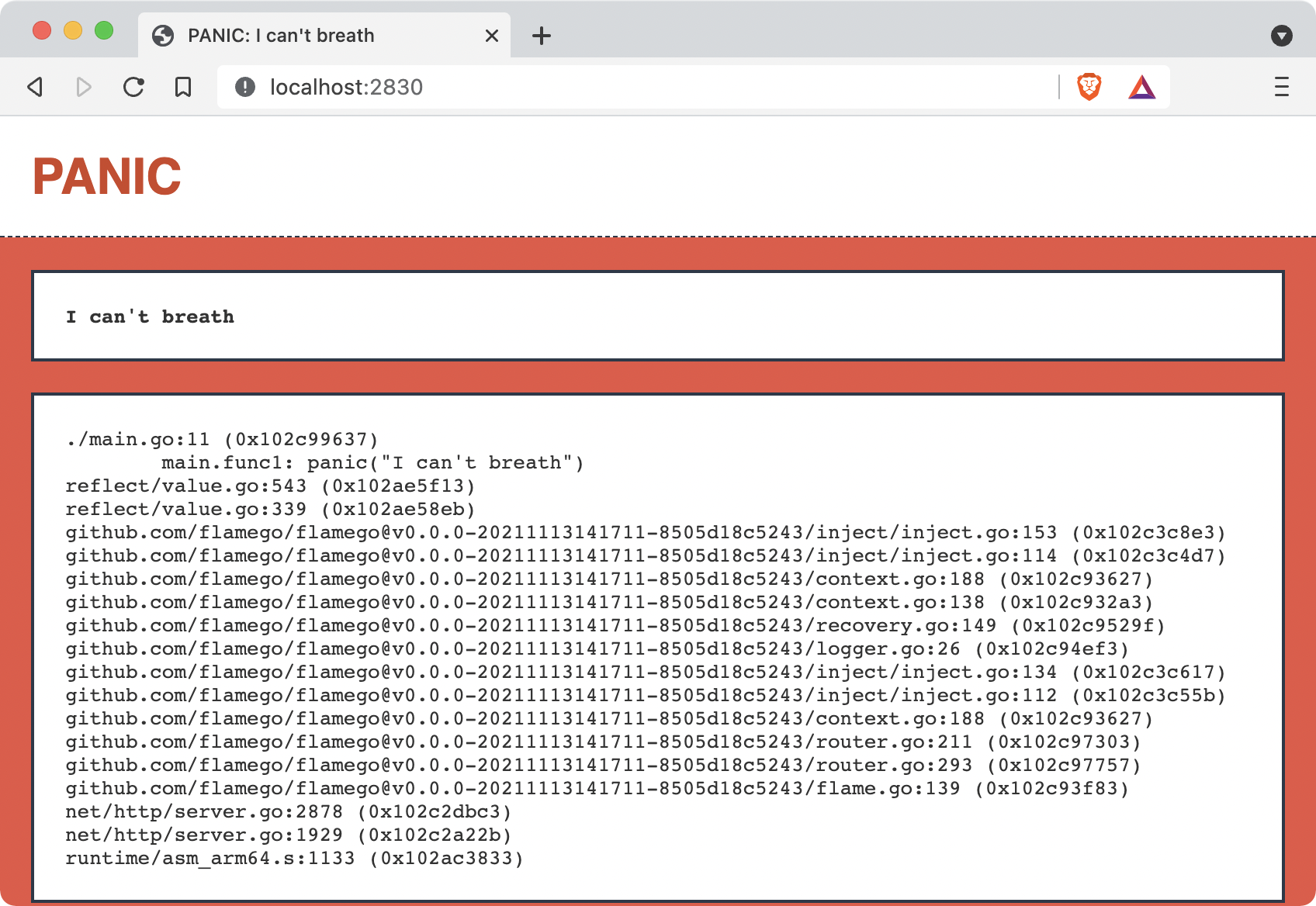
When you run the above program and visit http://localhost:2830/, the recovered page is displayed:
To return the panic and stack trace as plain text in development mode, pass
flamego.RecoveryOptions:
f.Use(flamego.Recovery(
	flamego.RecoveryOptions{
		PlainText: true,
	},
))
Serving static files
flamego.Classic to create a Flame instance.The flamego.Static is the middleware that is for serving static files, and it accepts an optional flamego.StaticOptions:
func main() {
	f := flamego.New()
	f.Use(flamego.Static(
		flamego.StaticOptions{
			Directory: "public",
		},
	))
	f.Run()
}
You may also omit passing the options for using all default values:
func main() {
	f := flamego.New()
	f.Use(flamego.Static())
	f.Run()
}
Example: Serving the source file
In this example, we’re going to treat our source code file as the static resources:
package main

import (
	"github.com/flamego/flamego"
)

func main() {
	f := flamego.New()
	f.Use(flamego.Static(
		flamego.StaticOptions{
			Directory: "./",
			Index:     "main.go",
		},
	))
	f.Run()
}
On line 11, we changed the Directory to be the working directory ("./") instead of the default value "public".
On line 12, we changed the index file (the file to be served when listing a directory) to be main.go instead of the default value "index.html".
When you save the above program as main.go and run it, both curl http://localhost:2830/ and curl http://localhost:2830/main.go will response the content of this main.go back to you.
Example: Serving multiple directories
In this example, we’re going to serve static resources for two different directories.
Here is the setup for the example:
$ tree .
.
├── css
│   └── main.css
├── go.mod
├── go.sum
├── js
│   └── main.js
└── main.goYou may have noticed that the client should not include the value of Directory, which are "css" and "js" in the example. If you would like the client to include these values, you can use the Prefix option:
f.Use(flamego.Static(
    flamego.StaticOptions{
        Directory: "css",
        Prefix:    "css",
    },
))
💡 Did you know?
The value of Prefix does not have to be the same as the value of Directory.
Example: Serving the embed.FS
In this example, we’re going to serve static resources from the embed.FS that was introduced in Go 1.16.
Here is the setup for the example:
tree .
.
├── css
│   └── main.css
├── go.mod
├── go.sum
└── main.goBecause the Go embed encodes the entire path (i.e. including parent directories), the client have to use the full path, which is different from serving static files directly from the local disk.
In other words, the following command will not work for the example:
$ curl http://localhost:2830/main.css
404 page not found
Rendering content
The flamego.Renderer is a minimal middleware that is for rendering content, and it accepts an optional flamego.RenderOptions.
The service flamego.Render is injected to your request context and you can use it to render JSON, XML, binary and plain text content:
package main

import (
	"net/http"

	"github.com/flamego/flamego"
)

func main() {
	f := flamego.New()
	f.Use(flamego.Renderer(
		flamego.RenderOptions{
			JSONIndent: "  ",
		},
	))
	f.Get("/", func(r flamego.Render) {
		r.JSON(http.StatusOK,
			map[string]interface{}{
				"id":       1,
				"username": "joe",
			},
		)
	})
	f.Run()
}JSONIndent: "",, then redo all test requests and see what changes.